Meta description: Understand HEX, RGB and HSL color codes with practical examples. Learn how to convert colors and create beautiful website palettes.
Suggested slug: hex-vs-rgb-vs-hsl-guide
Primary keyword: HEX vs RGB vs HSL
Secondary keywords: color code converter, HEX color codes, RGB values
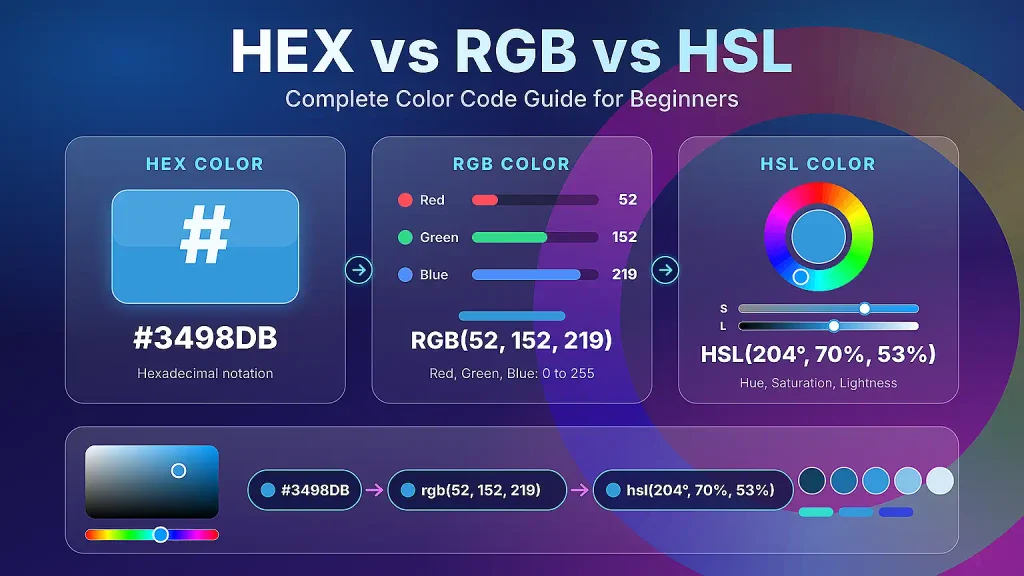
Featured image: a swatch graphic showing one blue written as #3498DB, rgb(52, 152, 219) and hsl(204, 70%, 53%). Suggested alt text: “The same blue color shown in HEX, RGB and HSL formats.”
Every color you see on a website, app or design file is, behind the scenes, just a set of numbers. Designers and developers write those numbers in a few different formats, and the three most common are HEX, RGB and HSL. If you have ever stared at something like #3498DB and wondered what it means, this guide is for you.
In this HEX vs RGB vs HSL comparison, you will learn how each format works, how the same color can be written in all three, how to convert between them, and which one to pick for different jobs. You will also see CSS examples, palette-building tips and the mistakes beginners make most often.
How Screens Make Color
Before looking at formats, it helps to know how a screen produces color. Every pixel on your monitor or phone contains tiny red, green and blue lights. By mixing those three lights at different brightness levels, a screen can display millions of colors. This is called the additive color model: more light means a brighter result.
- Red + green + blue at full strength = white
- All three at zero = black
- Equal amounts of all three = a shade of gray
HEX and RGB describe colors directly in terms of these three lights. HSL describes the same colors in a way that matches how humans think about them. All three formats can represent exactly the same colors (in the standard sRGB color space used by the web), so choosing one is mostly about convenience.
Our Example Color
Throughout this guide we will use one friendly blue:
| Format | Value |
|---|---|
| HEX | #3498DB |
| RGB | rgb(52, 152, 219) |
| HSL | hsl(204, 70%, 53%) |
These three lines describe the identical color. Let’s see why.
RGB Values Explained
RGB stands for Red, Green, Blue. An RGB color has three channels, and each channel is a number from 0 to 255.
- 0 means that light is completely off.
- 255 means that light is at full brightness.
Why 255? Computers store each channel in 8 bits, and 8 bits can hold 256 different values (0 through 255). Three channels of 256 values each give 256 × 256 × 256 = 16,777,216 possible colors.
In our example, rgb(52, 152, 219):
- Red = 52 (quite low)
- Green = 152 (medium-high)
- Blue = 219 (high)
Blue dominates, with a fair amount of green and a little red, which gives a clear sky-blue tone. Here are some basic RGB values worth memorizing:
| Color | RGB value |
|---|---|
| Black | rgb(0, 0, 0) |
| White | rgb(255, 255, 255) |
| Pure red | rgb(255, 0, 0) |
| Pure green | rgb(0, 255, 0) |
| Pure blue | rgb(0, 0, 255) |
| Yellow | rgb(255, 255, 0) |
| Gray | rgb(128, 128, 128) |
Notice that yellow is red plus green. That surprises many beginners who learned color mixing with paint, but light mixes differently from pigment.
RGB also has an alpha version, rgba(), which adds transparency from 0 (invisible) to 1 (solid). For example, rgba(52, 152, 219, 0.5) is our blue at 50% opacity. Modern CSS also lets you write rgb(52 152 219 / 50%).
HEX Color Codes Explained
HEX color codes are simply RGB values written in hexadecimal, a base-16 number system. Instead of ten digits (0–9), hexadecimal uses sixteen symbols: 0–9 and then A–F, where A = 10, B = 11, C = 12, D = 13, E = 14 and F = 15.
A HEX code looks like #RRGGBB:
- The first two characters are the red channel
- The next two are green
- The last two are blue
Each pair is a two-digit hexadecimal number from 00 (0) to FF (255).
How to Read a Hexadecimal Pair
To convert a pair to decimal, multiply the first digit by 16 and add the second digit.
Let’s decode #3498DB:
- 34 → 3 × 16 + 4 = 48 + 4 = 52 (red)
- 98 → 9 × 16 + 8 = 144 + 8 = 152 (green)
- DB → D (13) × 16 + B (11) = 208 + 11 = 219 (blue)
That gives rgb(52, 152, 219), exactly what we expected.
Converting RGB to HEX
Going the other way, divide each channel by 16. The whole-number result is the first digit and the remainder is the second.
Take the green value 152: 152 ÷ 16 = 9 remainder 8, so the pair is 98. Take blue, 219: 219 ÷ 16 = 13 remainder 11, and since 13 = D and 11 = B, the pair is DB.
Shorthand HEX
When both digits in every pair match, CSS lets you shorten the code to three characters. #FF6600 becomes #F60, and #FFFFFF becomes #FFF. The browser simply doubles each digit. Our blue, #3498DB, cannot be shortened because its pairs are not repeated digits.
HEX with Transparency
HEX can also carry an alpha channel by adding two more characters: #RRGGBBAA. The alpha pair also ranges from 00 (fully transparent) to FF (fully opaque). For example, #3498DB80 is our blue at roughly 50% opacity, because 80 in hexadecimal is 128, and 128 ÷ 255 is about 0.5.
Why Is HEX So Popular?
HEX color codes are compact, easy to copy and paste, and supported everywhere: design tools, brand guidelines, CSS, email templates and image editors. If someone sends you a brand color, there is a good chance it arrives as a HEX code.
HSL Explained: Hue, Saturation and Lightness
HEX and RGB are great for computers but awkward for humans. Quick: how would you make rgb(52, 152, 219) a little darker? You would have to lower all three numbers in the right proportions. HSL solves that problem.
HSL stands for Hue, Saturation, Lightness, and each part has an intuitive meaning.
Hue (0–360)
Hue is the basic color, represented as an angle on a color wheel:
- 0° = red
- 60° = yellow
- 120° = green
- 180° = cyan
- 240° = blue
- 300° = magenta
- 360° = back to red
Our example has a hue of 204°, which sits between cyan and blue, matching the sky-blue look.
Saturation (0%–100%)
Saturation describes color intensity. At 100% the color is vivid and pure; at 0% it is completely gray. Our blue has 70% saturation, so it is bright but not neon.
Lightness (0%–100%)
Lightness controls how light or dark the color is. 0% is always black, 100% is always white, and 50% is the “normal” version of the color. Our blue is at 53%, very close to the middle.
Why HSL Is Beginner-Friendly
With HSL, adjusting a color is predictable:
- Want a darker button on hover? Lower lightness:
hsl(204, 70%, 43%). - Want a soft background tint? Raise lightness:
hsl(204, 70%, 93%). - Want a muted version? Lower saturation:
hsl(204, 30%, 53%).
You never touch the hue, so the color family stays consistent.
Converting Between HEX, RGB and HSL
You will usually let a tool do the math (more on that below), but understanding the process makes the formats feel less mysterious.
Example: Converting RGB to HSL
Using rgb(52, 152, 219):
- Scale the channels to 0–1 by dividing by 255: R = 0.204, G = 0.596, B = 0.859.
- Find the maximum and minimum: max = 0.859 (blue), min = 0.204 (red). The difference is 0.655.
- Lightness is the average of max and min: (0.859 + 0.204) ÷ 2 = 0.531, or about 53%.
- Saturation (when lightness is above 0 and below 1) is difference ÷ (1 − |2L − 1|): 0.655 ÷ (1 − 0.063) = 0.655 ÷ 0.937 ≈ 0.70, or 70%.
- Hue: because blue is the largest channel, use 60 × ((R − G) ÷ difference + 4). That is 60 × ((0.204 − 0.596) ÷ 0.655 + 4) = 60 × (−0.598 + 4) ≈ 204°.
Result: hsl(204, 70%, 53%).
A Second Example: #FF5733
This vivid orange-red is #FF5733.
- HEX to RGB: FF = 255, 57 = 5 × 16 + 7 = 87, 33 = 3 × 16 + 3 = 51, so
rgb(255, 87, 51). - RGB to HSL: lightness = (255 + 51) ÷ 2 ÷ 255 = 60%; saturation = 100%; hue ≈ 11°. So
hsl(11, 100%, 60%).
Quick Reference Table
| Color | HEX | RGB | HSL |
|---|---|---|---|
| Sky blue | #3498DB | rgb(52, 152, 219) | hsl(204, 70%, 53%) |
| Orange-red | #FF5733 | rgb(255, 87, 51) | hsl(11, 100%, 60%) |
| Pure red | #FF0000 | rgb(255, 0, 0) | hsl(0, 100%, 50%) |
| Pure green | #00FF00 | rgb(0, 255, 0) | hsl(120, 100%, 50%) |
| Pure blue | #0000FF | rgb(0, 0, 255) | hsl(240, 100%, 50%) |
| White | #FFFFFF | rgb(255, 255, 255) | hsl(0, 0%, 100%) |
| Black | #000000 | rgb(0, 0, 0) | hsl(0, 0%, 0%) |
Use a Color Code Converter
Doing this by hand is great for learning, but slow in real projects. A color code converter gives you instant, accurate results. You can paste a value and see it in every format with the Color Code Studio, then copy whichever version your project needs.
CSS Examples
All three formats work in CSS. Here is the same blue written three ways:
.button {
  background-color: #3498db;
}

.button {
  background-color: rgb(52, 152, 219);
}

.button {
  background-color: hsl(204, 70%, 53%);
}
They all render identically. The differences show up when you start building systems. Here is a practical example using CSS custom properties with HSL:
:root {
  --brand-h: 204;
  --brand-s: 70%;
  --brand: hsl(var(--brand-h) var(--brand-s) 53%);
  --brand-dark: hsl(var(--brand-h) var(--brand-s) 38%);
  --brand-light: hsl(var(--brand-h) var(--brand-s) 92%);
}

.button {
  background: var(--brand);
  color: white;
}

.button:hover {
  background: var(--brand-dark);
}

.card {
  background: var(--brand-light);
}
Changing a single variable, such as --brand-h, updates the entire theme. Doing the same with HEX would require recalculating every shade by hand.
Transparency is just as simple:
.overlay {
  background: rgb(0 0 0 / 40%);
}

.badge {
  background: hsl(204 70% 53% / 20%);
}
When to Use Each Format
Use HEX when…
- You are copying colors from a brand guide or design tool such as Figma.
- You want short, easy-to-share values.
- You are writing simple static styles.
Use RGB when…
- You are working with canvas, JavaScript graphics or image processing, where channel values are used directly.
- You need to calculate or blend colors mathematically.
- You are using the
rgba()pattern for transparency in older code.
Use HSL when…
- You are building a design system or theme with many related shades.
- You want hover, active and disabled states that stay in the same color family.
- You are learning color theory and want to experiment visually.
- You want to generate palettes in code.
A common professional workflow is to store brand colors as HEX, then convert to HSL when building shades and variations.
Color Palette Tips for Beginners
HSL makes palette creation much easier. Using our blue (hue 204°) as the starting point:
1. Monochromatic palette. Keep the hue and saturation, and change only lightness: hsl(204, 70%, 20%), hsl(204, 70%, 40%), hsl(204, 70%, 53%), hsl(204, 70%, 75%), hsl(204, 70%, 92%). It always looks harmonious.
2. Complementary palette. Add 180° to the hue to find the opposite color: 204° + 180° = 384°, which wraps to 24°. That gives an orange accent, hsl(24, 70%, 53%), that makes the blue stand out. Use it sparingly for call-to-action buttons.
3. Analogous palette. Pick hues 30° on either side: 174° (teal) and 234° (indigo). These neighbors feel calm and cohesive.
4. Triadic palette. Space three hues 120° apart: 204°, 324° and 84°. It is more playful and works best when one color dominates.
5. Follow the 60-30-10 rule. Use a dominant color for about 60% of the design (often a neutral), a secondary color for 30%, and an accent for 10%.
6. Build neutrals from your brand hue. Instead of pure gray, try hsl(204, 10%, 95%) for backgrounds and hsl(204, 15%, 20%) for text. A hint of blue makes the page feel cohesive.
7. Check contrast. Text must be readable. The Web Content Accessibility Guidelines (WCAG) recommend a contrast ratio of at least 4.5:1 for normal body text. Light gray on white often fails this test, so always check before shipping.
To experiment, try the shades and conversions in the Color Code Studio and save the values that fit your project.
Common Mistakes to Avoid
1. Forgetting the hash symbol. In CSS, 3498DB does not work; it must be #3498DB.
2. Using invalid HEX lengths. Valid lengths are 3, 4, 6 and 8 characters (excluding the hash). A five-character code like #3498D is invalid.
3. Using out-of-range values. RGB channels go from 0 to 255, saturation and lightness from 0% to 100%. Values beyond those ranges get clamped or ignored.
4. Leaving out the percent signs in HSL. In traditional syntax, saturation and lightness need the % symbol: hsl(204, 70%, 53%), not hsl(204, 70, 53).
5. Assuming 50% lightness is “halfway between dark and light” for every hue. Yellow at 50% lightness looks much brighter than blue at 50% lightness, because human eyes perceive hues differently. Always judge by eye, not just by number.
6. Mixing paint logic with light logic. On screens, red plus green makes yellow, not brown.
7. Using too many colors. A great website usually needs one primary color, one accent and a few neutrals.
8. Ignoring accessibility. Never rely on color alone to communicate meaning, such as red for errors. Add icons or text too, because many people have color vision deficiencies.
9. Rounding errors in conversion. Because HSL values are often rounded, converting HEX to HSL and back may shift a channel by one. This is normal and visually imperceptible.
Frequently Asked Questions
What is the difference between HEX, RGB and HSL?
HEX and RGB both describe a color by its red, green and blue amounts; HEX uses base-16 notation while RGB uses decimal numbers from 0 to 255. HSL describes color by hue, saturation and lightness, which is closer to how people think about color.
Do HEX, RGB and HSL produce different colors?
No. In standard web color (sRGB), they can represent the same colors. Small differences only appear from rounding during conversion.
Which color format is best for beginners?
Start by recognizing HEX, because you will see it everywhere. Then learn HSL for adjusting colors, since it is the most intuitive.
What does the hash symbol in a HEX code mean?
It simply tells CSS that what follows is a hexadecimal color value. It is not part of the number itself.
How many colors can HEX represent?
A six-digit HEX code can represent 16,777,216 colors, the same as RGB with 8 bits per channel.
Can I use transparency with each format?
Yes. Use rgb(r g b / alpha) or rgba(), hsl(h s l / alpha) or hsla(), and 8-digit HEX such as #3498DB80.
How do I convert HEX to RGB quickly?
Split the code into three pairs and convert each pair from hexadecimal to decimal. Or paste it into a color code converter such as the Color Code Studio for an instant result.
Why is HSL good for dark mode?
Because you can keep the hue consistent and adjust lightness and saturation to create a dark theme that feels related to the light one.
What are web-safe colors?
Web-safe colors were a limited 216-color palette used when old displays could only show 256 colors. Modern screens make them unnecessary.
Is there a performance difference between formats?
No meaningful one. Browsers convert all formats internally, so choose based on readability and workflow.
Final Thoughts
HEX, RGB and HSL are three ways of writing the same idea: a color made of light. HEX is compact and universal, RGB shows the raw channel values, and HSL gives you human-friendly controls for building palettes and themes. Once you understand how they relate, you can read any color code you meet and convert it with confidence.
The best way to learn is to practice. Pick a color, write it in all three formats, tweak the hue, saturation and lightness, and see what happens. A tool like the Color Code Studio makes that experimentation fast, so you can spend less time calculating and more time designing.